Each section names the problem, the idea in one line, what you will be able to do, and the method from the book.
1. What it does well
The problem: You hear about AI daily but don't know where it would help.
AI is strongest at work that is mostly about words and patterns, where a good first version saves time and a human can quickly judge the result.
By the end of the chapter you can:
- Spot tasks in the sweet spot
- Name seven jobs AI does well, with an example of each
- Choose your first three AI jobs
Seven jobs AI does well
Almost every useful task in an office falls into one of these seven jobs. Learn to recognise them in your own week.
| Job | What it means | Example from Indian workplaces |
|---|---|---|
| Draft | Write a first version | A reply to a dealer's complaint; a job post; a proposal outline |
| Summarise | Make long things short | A 30-page tender in one page; a long email thread in five lines |
| Extract | Pull out specific items | All dates and amounts from a contract; action points from minutes |
| Rewrite | Change tone, length or reader | Make a stern note polite; turn a technical report into plain words for the owner |
| Translate | Change language | A circular into Marathi, Tamil or Hindi for the shop floor |
| Generate options | Offer several ideas | Ten names for a new product; five ways to handle a late payer |
| Explain | Teach a concept | What is EBITDA? What does this clause mean? (Then check.) |
2. Give it your material
The problem: You ask AI vague questions and get vague answers.
AI is far more accurate when it works from your material than from its memory. Give it the notes, files and examples, and tell it to stay within them.
By the end of the chapter you can:
- Choose what material to give AI for a task
- Keep AI's answer within your material
- Use past work as an example of the style you want
What to give it
Different tasks need different material. A quick guide:
| Task | Material to give | Tip |
|---|---|---|
| Reply to a message | The full message or thread | Include earlier replies for history |
| Report or commentary | Your figures, last month's report | Ask it to use your structure |
| Summary | The document itself | Say who the summary is for |
| Proposal or quote letter | Customer's request, your price sheet (masked), a past proposal | Mark which parts may not change |
| Policy or circular | Old version, notes on what changes | Ask it to list every change it made |
| Meeting prep | Agenda, numbers, last minutes | Ask for likely questions |
3. Emails and messages
The problem: Emails, minutes and reports eat your day.
Email and WhatsApp are where AI saves most managers the most time. Use it to draft replies, chase politely and say difficult things well, and never let it send for you.
By the end of the chapter you can:
- Sort and reply to email faster
- Write follow-ups that get answers
- Handle hard messages calmly and clearly
Replies in four minutes
For a routine reply: paste the incoming email, add two or three lines of what you want to say, and set the format. Then edit.
| Habit | Why |
|---|---|
| Paste the whole incoming email | AI answers what was asked, not what you remember |
| Write your points as bullets | Fast for you; AI turns them into sentences |
| Say “no introduction” | Removes “Thank you for your email regarding…” |
| Ask for the reply in the sender's language | If they wrote in Hindi, reply in Hindi |
4. A month of post ideas in an hour
The problem: You know you should post more, but content takes days.
A small set of content pillars and a simple calendar turn random posting into a plan. AI fills the calendar with ideas in minutes; you choose what's worth making.
By the end of the chapter you can:
- Choose three to five content pillars
- Generate and select a month of ideas
- Keep a simple calendar that guides the month
Content pillars
Pillars are the three to five themes you post about again and again. They keep content varied but recognisable, and they make AI's ideas relevant.
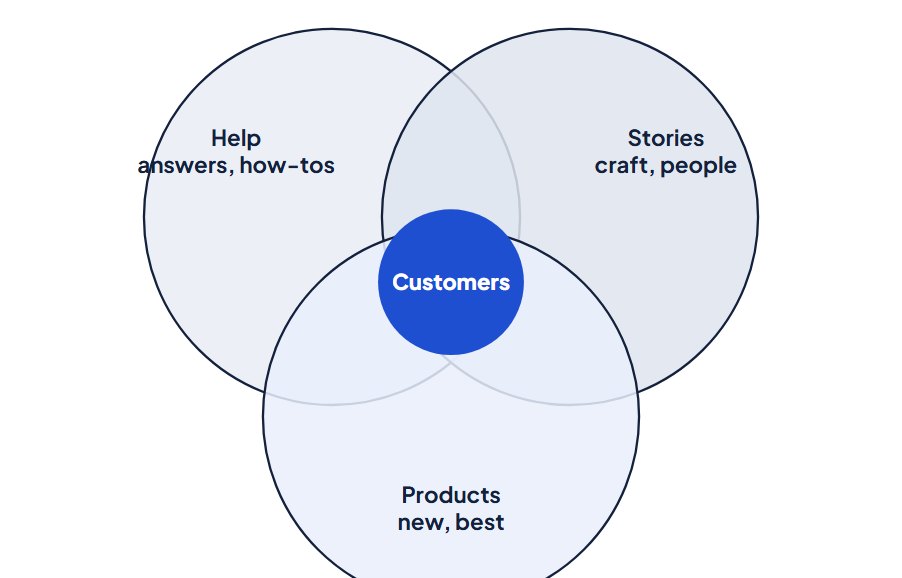
| Pillar | Ananta Silks example | Why it works |
|---|---|---|
| Craft stories | Weavers, looms, how a Kanjeevaram is made | Builds trust and justifies price |
| Styling and help | Draping, occasion guides, care tips | Useful, often saved and shared |
| New arrivals | Fresh stock, shown honestly | Drives visits and sales |
| Customers | Brides and families who chose Ananta (with permission) | Social proof from real people |
5. Reply templates and FAQs
The problem: Customers wait for answers and leads go cold.
Good answers, written once and kept current, are the foundation of fast service, whether staff or a bot uses them. AI helps you write them quickly and consistently.
By the end of the chapter you can:
- Build an answer library from real questions
- Write answers that are short, correct and kind
- Keep answers current with an owner and a review date
Write FAQ answers that work
A good FAQ answer is short, specific, correct and tells the customer what to do next. AI drafts these quickly from your facts.
6. Read invoices, bills and statements
The problem: Month-end means late nights matching entries.
Reading documents is where AI saves accounts teams the most time. Let it turn PDFs and photos into tables, then check the fields that matter before anything enters your books.
By the end of the chapter you can:
- Extract the right fields from bills and statements
- Check extracted data quickly and reliably
- Handle receipts and petty cash with less effort
What to extract
Decide the fields once, in the order your accounting system needs them. A fixed list makes AI's output consistent and the import simple.
| Field | Why it matters | Common error |
|---|---|---|
| Supplier name and GSTIN | Correct party; input tax credit | Wrong digit in GSTIN |
| Invoice number and date | Duplicates; period | Date format mixed up (day/month) |
| Taxable value | Purchase cost | Picks a subtotal before discount |
| Tax amounts by type | Input tax | Split between types wrong |
| Invoice total | Payable amount | Rounding line missed |
| Items or HSN (if needed) | Stock and classification | Long item lists cut short |
7. Get your data ready
The problem: The answers are in your data, but you wait for an analyst.
AI reads data the way a newcomer would. Clear layouts, clear column names and written definitions make the difference between right and wrong answers.
By the end of the chapter you can:
- Lay out data so AI reads it correctly
- Clean common problems quickly
- Write a short data dictionary with your definitions
Column names AI understands
AI guesses what a column means from its name. Clear names remove guesses.
| Unclear | Clear |
|---|---|
| Amt | Net sales value (₹, after returns and discounts) |
| Val2 | Gross value (₹, before returns) |
| Qty | Quantity (cartons) |
| Dt | Invoice date (DD-MM-YYYY) |
| Cust | Shop code |
| Flag | Scheme applied (Yes/No) |
8. Research in an hour
The problem: AI sounds sure of itself and you can't tell when it's wrong.
AI can map a topic fast: the questions to ask, the sources to read, the players to know. Use it to plan and gather; verify the facts before they go into any decision.
By the end of the chapter you can:
- Plan research questions with AI
- Gather facts with sources in an hour
- Judge which sources to trust
Use search-enabled tools
For research, use a tool that searches the web and shows its sources, or a dedicated research feature that reads many pages and writes a report with citations. Plain chat is for planning and thinking, not facts.
| Use | For |
|---|---|
| Quick search answer | A single fact with a link: a company's headquarters, a scheme's name |
| Deep research report | A topic overview from many sources, with citations, in 10–30 minutes |
| Plain chat | Planning questions, structuring findings, drafting, arguing |
| Your own documents attached | Analysing reports you already have |
9. Job descriptions and job posts
The problem: HR paperwork eats the time meant for your people.
A clear, honest, inclusive job post attracts the right applicants and fewer wrong ones. AI drafts it fast from your notes; you make sure it's true and fair.
By the end of the chapter you can:
- Draft a job description from the role's results
- Write job posts that are clear and inclusive
- Adapt posts for local languages and channels
Start from the results, not a wish list
Many job descriptions are wish lists copied from the last one. Start instead from what the person must achieve in their first year, then work out what they need.
| Wish-list requirement | Results-based alternative |
|---|---|
| Graduate in any discipline | Can handle billing and basic counting accurately (tested) |
| Excellent English communication | Can speak politely with customers in Hindi; basic English reading |
| 2–3 years' retail experience | Comfortable standing for long shifts and dealing with customers |
10. Map the workflow
The problem: The same tasks repeat every day and you still do them by hand.
Before building anything, draw the workflow: what starts it, each step, what comes out, and where a person checks. A clear map makes building easy and failures rare.
By the end of the chapter you can:
- Map a workflow in four parts
- Design the automated version with check points
- Plan for exceptions and failures
Four parts of every workflow
Every workflow, by hand or automated, has the same four parts.
Trigger: what starts it → Steps: what happens → Output: what comes out → Check: who confirms it's right
| Part | Question | Daily sales report example |
|---|---|---|
| Trigger | What starts it, and when? | Every working day at 8.30 am |
| Steps | What happens, in order? | Export yesterday's sales; total by warehouse and category; compare with last week; write a short summary |
| Output | What comes out, to whom? | A one-page summary email to Karthik and the three warehouse heads |
| Check | Who confirms it's right, how? | Karthik reads and approves before it goes to the owner |
| Part | Common mistake |
|---|---|
| Trigger | Unclear timing (“when the export is ready”) instead of a fixed time or event |
| Steps | Hidden manual steps nobody wrote down |
| Output | No named recipient or format |
| Check | Missing entirely, or “someone will look” |
11. Write a one-page AI policy
The problem: Your team uses AI with no rules and no training.
A short, clear AI policy that people actually read beats a long one nobody follows. One page: what's encouraged, what's allowed, what's never allowed, and who to ask.
By the end of the chapter you can:
- Write a one-page AI policy
- Sort uses into allowed, careful and never
- Launch the policy so people understand and follow it
What the policy covers
Most one-page AI policies cover the same ten points. Adapt the wording to your business.
| Section | Covers |
|---|---|
| Purpose | Why we use AI and what we expect |
| Approved tools | Which tools and accounts may be used |
| Allowed uses | Encouraged everyday uses |
| Careful uses | Uses that need extra checking or approval |
| Never | Prohibited uses |
| Data rules | What never goes into AI tools (Chapter 3) |
| Checking and ownership | You check it; you own it |
| Openness | When to tell people AI was used |
| Incidents | What to do if something goes wrong |
| Owner and review | Who to ask; when it's updated |
This article is adapted from the book. Examples marked “Example” use invented names and numbers; company stories are based on public sources listed in the book. For general learning; use your own judgement for your situation.